> ## Documentation Index
> Fetch the complete documentation index at: https://docs.peaka.com/llms.txt
> Use this file to discover all available pages before exploring further.
# Peaka as a Data Management Backend
Peaka is a powerful data management backend that enables seamless integration and efficient data operations. Users can create projects to organize their data and establish catalogs for easier access.
Users can run queries to retrieve specific information or perform operations. Peaka's caching capabilities enhance performance by storing frequently accessed data, reducing retrieval times. This ensures efficient data operations, allowing users to focus on insights rather than waiting for processes to complete. Overall, Peaka empowers users to manage their data effectively in backend.
## Key Features
* **Seamless Integration**: Easily connect with various third-party services to enhance your data management capabilities.
* **Efficient Data Operations**: Utilize APIs for creating projects, catalogs, and executing queries to streamline your data workflows.
* **Advanced Caching**: Optimize performance with a versatile caching API that supports creating, updating, and managing cache states.
* **Query Execution**: Execute queries to retrieve specific information or perform operations.
## Step-by-Step Implementation
### 1. Creating Partner API Key
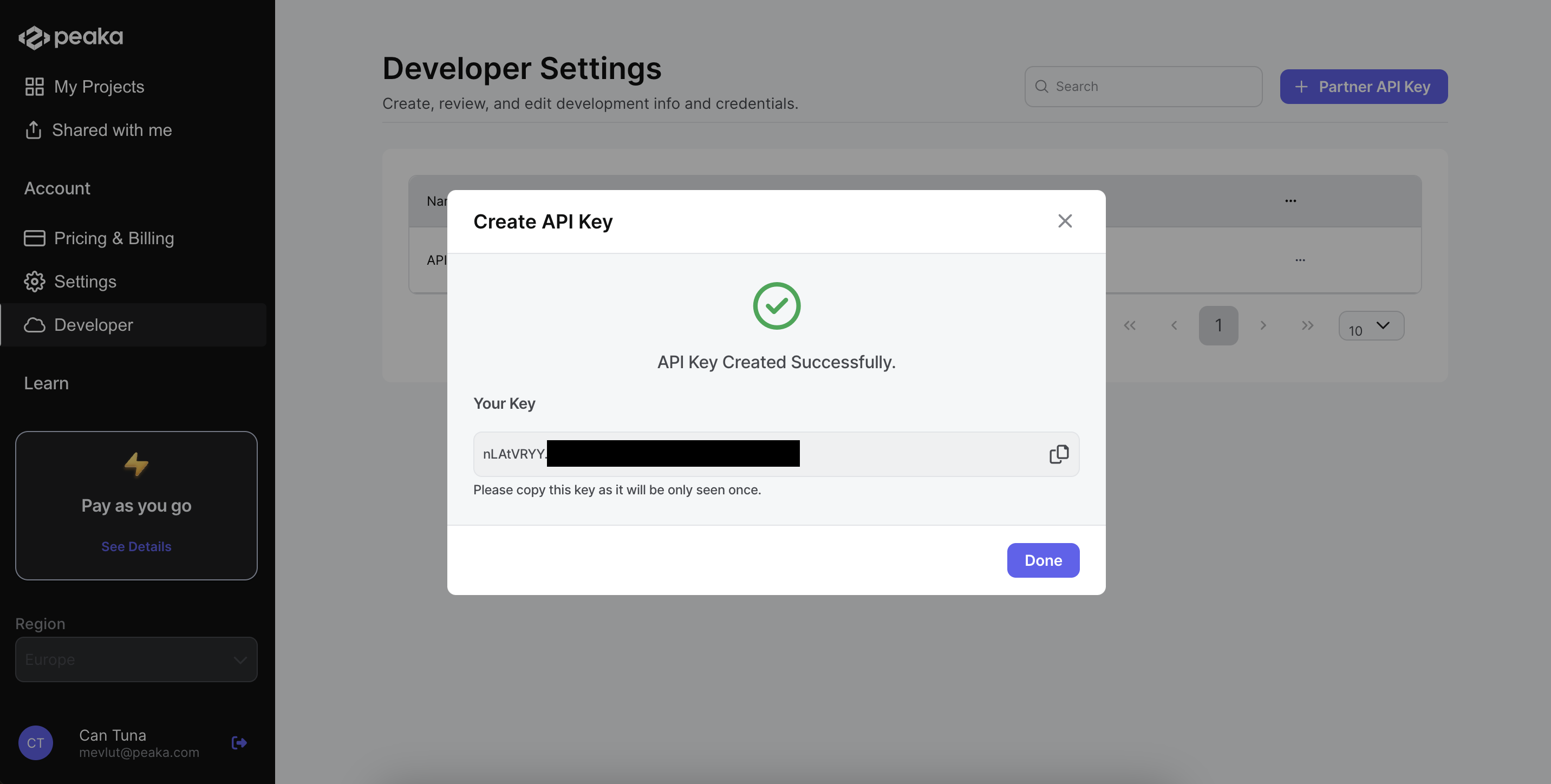
* Prior to initiating the creation of a project, it is essential to generate a Partner API key. This key serves as a crucial authentication mechanism for your project creation requests to the Peaka API, ensuring secure and authorized access.
* Navigate to the [Developer](https://peaka.studio/home/advanced-settings) section.
* Click on the Partner API Key button to open a dialog box.
* Fill in the form by entering your desired API Key Name.
* Click on the Create button.
* You can copy the API key from the dialog box.
For detailed guidance, please refer to the documentation on [how to create a partner API key](https://docs.peaka.com/how-to-guides/how-to-manage-partner-api-key#creating-a-partner-api-key).
 ### 2. Creating a Project
* Now you have your partner API key, and you need to create a project that will act as a centralized repository for effectively storing and caching your data.
* Create your project by using below API.
For detailed guidance, please refer to the documentation on [how to create a project](https://docs.peaka.com/api-reference/organization--projects/create-project).
```javascript cURL theme={null}
curl --request POST \
--url https://partner.peaka.studio/api/v1/organizations/{organizationId}/workspaces/{workspaceId}/projects \
--header 'Authorization: Bearer ' \
--header 'Content-Type: application/json' \
--data '{
"name": "Sample Project Name"
}'
```
```javascript JavaScript theme={null}
const url = 'https://partner.peaka.studio/api/v1/organizations/{organizationId}/workspaces/{workspaceId}/projects';
const options = {
method: 'POST',
headers: {Authorization: 'Bearer ', 'Content-Type': 'application/json'},
body: '{"name":"Sample Project Name"}'
};
try {
const response = await fetch(url, options);
const data = await response.json();
console.log(data);
} catch (error) {
console.error(error);
}
```
```python Python theme={null}
import requests
url = "https://partner.peaka.studio/api/v1/organizations/{organizationId}/workspaces/{workspaceId}/projects"
payload = { "name": "Sample Project Name" }
headers = {
"Authorization": "Bearer ",
"Content-Type": "application/json"
}
response = requests.post(url, json=payload, headers=headers)
print(response.json())
```
```php PHP theme={null}
$curl = curl_init();
curl_setopt_array($curl, [
CURLOPT_URL => "https://partner.peaka.studio/api/v1/organizations/{organizationId}/workspaces/{workspaceId}/projects",
CURLOPT_RETURNTRANSFER => true,
CURLOPT_ENCODING => "",
CURLOPT_MAXREDIRS => 10,
CURLOPT_TIMEOUT => 30,
CURLOPT_HTTP_VERSION => CURL_HTTP_VERSION_1_1,
CURLOPT_CUSTOMREQUEST => "POST",
CURLOPT_POSTFIELDS => json_encode([
'name' => 'Sample Project Name'
]),
CURLOPT_HTTPHEADER => [
"Authorization: Bearer ",
"Content-Type: application/json"
],
]);
$response = curl_exec($curl);
$err = curl_error($curl);
curl_close($curl);
if ($err) {
echo "cURL Error #:" . $err;
} else {
echo $response;
}
```
```go Go theme={null}
package main
import (
"fmt"
"strings"
"net/http"
"io"
)
func main() {
url := "https://partner.peaka.studio/api/v1/organizations/{organizationId}/workspaces/{workspaceId}/projects"
payload := strings.NewReader("{\n \"name\": \"Sample Project Name\"\n}")
req, _ := http.NewRequest("POST", url, payload)
req.Header.Add("Authorization", "Bearer ")
req.Header.Add("Content-Type", "application/json")
res, _ := http.DefaultClient.Do(req)
defer res.Body.Close()
body, _ := io.ReadAll(res.Body)
fmt.Println(res)
fmt.Println(string(body))
}
```
```java Java theme={null}
HttpResponse response = Unirest.post("https://partner.peaka.studio/api/v1/organizations/{organizationId}/workspaces/{workspaceId}/projects")
.header("Authorization", "Bearer ")
.header("Content-Type", "application/json")
.body("{\n \"name\": \"Sample Project Name\"\n}")
.asString();
```
```javascript theme={null}
{
"id": "URNg0GIj",
"name": "Sample Project Name",
"description": "Non accusantium ducimus accusantium. Laborum eum accusamus sit sit hic eaque doloremque. Occaecati blanditiis facere consequuntur consectetur culpa reiciendis hic tempore dolorem. Saepe impedit nam necessitatibus maxime numquam voluptatum cum. Adipisci mollitia blanditiis sint inventore ex commodi occaecati ipsam quas.",
"domain": "sampleprojectname-cdcn",
"webhookBaseUrl": "https://sampleprojectname-cdcn--test.api.peaka.host",
"createdAt": "2024-09-10T10:11:02.385253956Z"
}
```
### 3. Create a API Key
* Now that you have created your project, you need to create a API key for your project.
* You will use the API key to authenticate your requests to the Peaka API.
For detailed guidance, please refer to the documentation on [how to create a project API key](https://docs.peaka.com/api-reference/projects--api-key/create-api-key).
```javascript cURL theme={null}
curl --request POST \
--url https://partner.peaka.studio/api/v1/projects/{projectId}/apiKeys \
--header 'Content-Type: application/json' \
--data '{
"name": "test"
}'
```
```javascript JavaScript theme={null}
const options = {
method: 'POST',
headers: {'Content-Type': 'application/json'},
body: '{"name":"test"}'
};
fetch('https://partner.peaka.studio/api/v1/projects/{projectId}/apiKeys', options)
.then(response => response.json())
.then(response => console.log(response))
.catch(err => console.error(err));
```
```python Python theme={null}
import requests
url = "https://partner.peaka.studio/api/v1/projects/{projectId}/apiKeys"
payload = {"name": "test"}
headers = {"Content-Type": "application/json"}
response = requests.request("POST", url, json=payload, headers=headers)
print(response.text)
```
```php PHP theme={null}
"https://partner.peaka.studio/api/v1/projects/{projectId}/apiKeys",
CURLOPT_RETURNTRANSFER => true,
CURLOPT_ENCODING => "",
CURLOPT_MAXREDIRS => 10,
CURLOPT_TIMEOUT => 30,
CURLOPT_HTTP_VERSION => CURL_HTTP_VERSION_1_1,
CURLOPT_CUSTOMREQUEST => "POST",
CURLOPT_POSTFIELDS => "{\n \"name\": \"test\"\n}",
CURLOPT_HTTPHEADER => [
"Content-Type: application/json"
],
]);
$response = curl_exec($curl);
$err = curl_error($curl);
curl_close($curl);
if ($err) {
echo "cURL Error #:" . $err;
} else {
echo $response;
}
```
```go Go theme={null}
package main
import (
"fmt"
"strings"
"net/http"
"io/ioutil"
)
func main() {
url := "https://partner.peaka.studio/api/v1/projects/{projectId}/apiKeys"
payload := strings.NewReader("{\n \"name\": \"test\"\n}")
req, _ := http.NewRequest("POST", url, payload)
req.Header.Add("Content-Type", "application/json")
res, _ := http.DefaultClient.Do(req)
defer res.Body.Close()
body, _ := ioutil.ReadAll(res.Body)
fmt.Println(res)
fmt.Println(string(body))
}
```
```java Java theme={null}
HttpResponse response = Unirest.post("https://partner.peaka.studio/api/v1/projects/{projectId}/apiKeys")
.header("Content-Type", "application/json")
.body("{\n \"name\": \"test\"\n}")
.asString();
```
```javascript theme={null}
{
"name": "test",
"apiKey": "TtgGcQFq.s3fzROFoop8uHG4pS2LYhoqn1rLb6oW6",
"apiKeyId": "21fd1a8d-88d5-4295-b792-5b2113138057"
}
```
### 4. Creating a Catalog
* You have successfully created your project and obtained your API key.
* The next step is to create a catalog, which will serve as a structured collection of data sourced from a specific origin.
* To view all available catalogs, you can utilize the API. See the documentation on [how to get a catalog list](https://docs.peaka.com/api-reference/data--catalogs/list-catalogs) for further instructions.
For detailed guidance, please refer to the documentation on [how to create a catalog ](https://docs.peaka.com/api-reference/data--catalogs/create-catalog).
```javascript cURL theme={null}
curl --request POST \
--url https://partner.peaka.studio/api/v1/data/projects/{projectId}/catalogs \
--header 'Content-Type: application/json' \
--data '{
"name": "exampleAirtableCatalog",
"catalogType": "airtable",
"connectionId": "8db17e23-29de-4dab-8886-af9717e0e742"
}'
```
```javascript JavaScript theme={null}
const options = {
method: 'POST',
headers: {'Content-Type': 'application/json'},
body: '{"name":"exampleAirtableCatalog","catalogType":"airtable","connectionId":"8db17e23-29de-4dab-8886-af9717e0e742"}'
};
fetch('https://partner.peaka.studio/api/v1/data/projects/{projectId}/catalogs', options)
.then(response => response.json())
.then(response => console.log(response))
.catch(err => console.error(err));
```
```python Python theme={null}
import requests
url = "https://partner.peaka.studio/api/v1/data/projects/{projectId}/catalogs"
payload = {
"name": "exampleAirtableCatalog",
"catalogType": "airtable",
"connectionId": "8db17e23-29de-4dab-8886-af9717e0e742"
}
headers = {"Content-Type": "application/json"}
response = requests.request("POST", url, json=payload, headers=headers)
```
```php PHP theme={null}
"https://partner.peaka.studio/api/v1/data/projects/{projectId}/catalogs",
CURLOPT_RETURNTRANSFER => true,
CURLOPT_ENCODING => "",
CURLOPT_MAXREDIRS => 10,
CURLOPT_TIMEOUT => 30,
CURLOPT_HTTP_VERSION => CURL_HTTP_VERSION_1_1,
CURLOPT_CUSTOMREQUEST => "POST",
CURLOPT_POSTFIELDS => "{\n \"name\": \"exampleAirtableCatalog\",\n \"catalogType\": \"airtable\",\n \"connectionId\": \"8db17e23-29de-4dab-8886-af9717e0e742\"\n}",
CURLOPT_HTTPHEADER => [
"Content-Type: application/json"
],
]);
$response = curl_exec($curl);
$err = curl_error($curl);
curl_close($curl);
if ($err) {
echo "cURL Error #:" . $err;
} else {
echo $response;
}
```
```go Go theme={null}
package main
import (
"fmt"
"strings"
"net/http"
"io/ioutil"
)
func main() {
url := "https://partner.peaka.studio/api/v1/data/projects/{projectId}/catalogs"
payload := strings.NewReader("{\n \"name\": \"exampleAirtableCatalog\",\n \"catalogType\": \"airtable\",\n \"connectionId\": \"8db17e23-29de-4dab-8886-af9717e0e742\"\n}")
req, _ := http.NewRequest("POST", url, payload)
req.Header.Add("Content-Type", "application/json")
res, _ := http.DefaultClient.Do(req)
defer res.Body.Close()
body, _ := ioutil.ReadAll(res.Body)
fmt.Println(res)
fmt.Println(string(body))
}
```
```java Java theme={null}
HttpResponse response = Unirest.post("https://partner.peaka.studio/api/v1/data/projects/{projectId}/catalogs")
.header("Content-Type", "application/json")
.body("{\n \"name\": \"exampleAirtableCatalog\",\n \"catalogType\": \"airtable\",\n \"connectionId\": \"8db17e23-29de-4dab-8886-af9717e0e742\"\n}")
.asString();
```
```javascript theme={null}
{
"id": "626654862255325504",
"name": "exampleairtablecatalog",
"displayName": "exampleAirtableCatalog",
"catalogType": "airtable",
"connectionId": "8db17e23-29de-4dab-8886-af9717e0e742"
}
```
### 5. Cache Your Catalog
* In this step, we will cache your catalog. This allows you to store frequently accessed data in a temporary storage area, which significantly enhances data retrieval speeds.
For detailed guidance, please refer to the documentation on [how to cache a catalog](https://docs.peaka.com/api-reference/data--cache/create-cache).
```javascript cURL theme={null}
curl --request POST \
--url https://partner.peaka.studio/api/v1/data/projects/{projectId}/cache \
--header 'Content-Type: application/json' \
--data '{
"catalogId": "627249916703408649",
"schemaName": "payment",
"tableName": "customers"
}'
```
```javascript JavaScript theme={null}
const options = {
method: 'POST',
headers: {'Content-Type': 'application/json'},
body: '{"catalogId":"627249916703408649","schemaName":"payment","tableName":"customers"}'
};
fetch('https://partner.peaka.studio/api/v1/data/projects/{projectId}/cache', options)
.then(response => response.json())
.then(response => console.log(response))
.catch(err => console.error(err));
```
```python Python theme={null}
import requests
url = "https://partner.peaka.studio/api/v1/data/projects/{projectId}/cache"
payload = {
"catalogId": "627249916703408649",
"schemaName": "payment",
"tableName": "customers"
}
headers = {"Content-Type": "application/json"}
response = requests.request("POST", url, json=payload, headers=headers)
print(response.text)
```
```php PHP theme={null}
"https://partner.peaka.studio/api/v1/data/projects/{projectId}/cache",
CURLOPT_RETURNTRANSFER => true,
CURLOPT_ENCODING => "",
CURLOPT_MAXREDIRS => 10,
CURLOPT_TIMEOUT => 30,
CURLOPT_HTTP_VERSION => CURL_HTTP_VERSION_1_1,
CURLOPT_CUSTOMREQUEST => "POST",
CURLOPT_POSTFIELDS => "{\n \"catalogId\": \"627249916703408649\",\n \"schemaName\": \"payment\",\n \"tableName\": \"customers\"\n}",
CURLOPT_HTTPHEADER => [
"Content-Type: application/json"
],
]);
$response = curl_exec($curl);
$err = curl_error($curl);
curl_close($curl);
if ($err) {
echo "cURL Error #:" . $err;
} else {
echo $response;
}
```
```go Go theme={null}
package main
import (
"fmt"
"strings"
"net/http"
"io/ioutil"
)
func main() {
url := "https://partner.peaka.studio/api/v1/data/projects/{projectId}/cache"
payload := strings.NewReader("{\n \"catalogId\": \"627249916703408649\",\n \"schemaName\": \"payment\",\n \"tableName\": \"customers\"\n}")
req, _ := http.NewRequest("POST", url, payload)
req.Header.Add("Content-Type", "application/json")
res, _ := http.DefaultClient.Do(req)
defer res.Body.Close()
body, _ := ioutil.ReadAll(res.Body)
fmt.Println(res)
fmt.Println(string(body))
}
```
```java Java theme={null}
HttpResponse response = Unirest.post("https://partner.peaka.studio/api/v1/data/projects/{projectId}/cache")
.header("Content-Type", "application/json")
.body("{\n \"catalogId\": \"627249916703408649\",\n \"schemaName\": \"payment\",\n \"tableName\": \"customers\"\n}")
.asString();
```
```javascript theme={null}
{
"id": "",
"appId": "",
"catalogId": "",
"schemaName": "",
"tableName": "",
"incrementalCacheSchedule": {
"expression": ""
},
"fullRefreshCacheSchedule": {
"expression": ""
}
}
```
### 6. Write Your Query
* Now you have created your project, API key, and catalog. Also cached your catalog.
* You are now ready to create queries that allow you to extract and refine data from your catalog based on your requirements.
For detailed guidance, please refer to the documentation on [how to create a query](https://docs.peaka.com/api-reference/data--queries/create-query).
```javascript cURL theme={null}
curl --request POST \
--url https://partner.peaka.studio/api/v1/data/projects/{projectId}/queries \
--header 'Content-Type: application/json' \
--data '{
"displayName": "sampleQuery",
"inputQuery": "SELECT * from \"mycatalog\".payment.customers"
}'
```
```javascript JavaScript theme={null}
const options = {
method: 'POST',
headers: {'Content-Type': 'application/json'},
body: '{"displayName":"sampleQuery","inputQuery":"SELECT * from \"mycatalog\".payment.customers"}'
};
fetch('https://partner.peaka.studio/api/v1/data/projects/{projectId}/queries', options)
.then(response => response.json())
.then(response => console.log(response))
.catch(err => console.error(err));
```
```python Python theme={null}
import requests
url = "https://partner.peaka.studio/api/v1/data/projects/{projectId}/queries"
payload = {
"displayName": "sampleQuery",
"inputQuery": "SELECT * from \"mycatalog\".payment.customers"
}
headers = {"Content-Type": "application/json"}
response = requests.request("POST", url, json=payload, headers=headers)
print(response.text)
```
```php PHP theme={null}
"https://partner.peaka.studio/api/v1/data/projects/{projectId}/queries",
CURLOPT_RETURNTRANSFER => true,
CURLOPT_ENCODING => "",
CURLOPT_MAXREDIRS => 10,
CURLOPT_TIMEOUT => 30,
CURLOPT_HTTP_VERSION => CURL_HTTP_VERSION_1_1,
CURLOPT_CUSTOMREQUEST => "POST",
CURLOPT_POSTFIELDS => "{\n \"displayName\": \"sampleQuery\",\n \"inputQuery\": \"SELECT * from \\\"mycatalog\\\".payment.customers\"\n}",
CURLOPT_HTTPHEADER => [
"Content-Type: application/json"
],
]);
$response = curl_exec($curl);
$err = curl_error($curl);
curl_close($curl);
if ($err) {
echo "cURL Error #:" . $err;
} else {
echo $response;
}
```
```go Go theme={null}
package main
import (
"fmt"
"strings"
"net/http"
"io/ioutil"
)
func main() {
url := "https://partner.peaka.studio/api/v1/data/projects/{projectId}/queries"
payload := strings.NewReader("{\n \"displayName\": \"sampleQuery\",\n \"inputQuery\": \"SELECT * from \\\"mycatalog\\\".payment.customers\"\n}")
req, _ := http.NewRequest("POST", url, payload)
req.Header.Add("Content-Type", "application/json")
res, _ := http.DefaultClient.Do(req)
defer res.Body.Close()
body, _ := ioutil.ReadAll(res.Body)
fmt.Println(res)
fmt.Println(string(body))
}
```
```java Java theme={null}
HttpResponse response = Unirest.post("https://partner.peaka.studio/api/v1/data/projects/{projectId}/queries")
.header("Content-Type", "application/json")
.body("{\n \"displayName\": \"sampleQuery\",\n \"inputQuery\": \"SELECT * from \\\"mycatalog\\\".payment.customers\"\n}")
.asString();
```
```javascript theme={null}
{
"id": "",
"displayName": "",
"name": "",
"inputQuery": "",
"inputQueryRefId": "",
"queryType": "",
"schedule": {
"expression": ""
}
}
```
### 7. Run Your Query
* Last step is to run your query.
* After running query is completed, you will get the data in response. You can use this data for further processing or analysis as needed.
For detailed guidance, please refer to the documentation on [how to run a query](https://docs.peaka.com/api-reference/data--queries/execute-query).
```javascript cURL theme={null}
curl --request POST \
--url https://partner.peaka.studio/api/v1/data/projects/{projectId}/queries/execute \
--header 'Content-Type: application/json' \
--data '{
"from": [
{
"catalogName": "peaka",
"schemaName": "query",
"tableName": "samplequery"
}
]
}'
```
```javascript JavaScript theme={null}
const options = {
method: 'POST',
headers: {'Content-Type': 'application/json'},
body: '{"from":[{"catalogName":"peaka","schemaName":"query","tableName":"samplequery"}]}'
};
fetch('https://partner.peaka.studio/api/v1/data/projects/{projectId}/queries/execute', options)
.then(response => response.json())
.then(response => console.log(response))
.catch(err => console.error(err));
```
```python Python theme={null}
import requests
url = "https://partner.peaka.studio/api/v1/data/projects/{projectId}/queries/execute"
payload = {"from": [
{
"catalogName": "peaka",
"schemaName": "query",
"tableName": "samplequery"
}
]}
headers = {"Content-Type": "application/json"}
response = requests.request("POST", url, json=payload, headers=headers)
print(response.text)
```
```php PHP theme={null}
"https://partner.peaka.studio/api/v1/data/projects/{projectId}/queries/execute",
CURLOPT_RETURNTRANSFER => true,
CURLOPT_ENCODING => "",
CURLOPT_MAXREDIRS => 10,
CURLOPT_TIMEOUT => 30,
CURLOPT_HTTP_VERSION => CURL_HTTP_VERSION_1_1,
CURLOPT_CUSTOMREQUEST => "POST",
CURLOPT_POSTFIELDS => "{\n \"from\": [\n {\n \"catalogName\": \"peaka\",\n \"schemaName\": \"query\",\n \"tableName\": \"samplequery\"\n }\n ]\n}",
CURLOPT_HTTPHEADER => [
"Content-Type: application/json"
],
]);
$response = curl_exec($curl);
$err = curl_error($curl);
curl_close($curl);
if ($err) {
echo "cURL Error #:" . $err;
} else {
echo $response;
}
```
```go Go theme={null}
package main
import (
"fmt"
"strings"
"net/http"
"io/ioutil"
)
func main() {
url := "https://partner.peaka.studio/api/v1/data/projects/{projectId}/queries/execute"
payload := strings.NewReader("{\n \"from\": [\n {\n \"catalogName\": \"peaka\",\n \"schemaName\": \"query\",\n \"tableName\": \"samplequery\"\n }\n ]\n}")
req, _ := http.NewRequest("POST", url, payload)
req.Header.Add("Content-Type", "application/json")
res, _ := http.DefaultClient.Do(req)
defer res.Body.Close()
body, _ := ioutil.ReadAll(res.Body)
fmt.Println(res)
fmt.Println(string(body))
}
```
```java Java theme={null}
HttpResponse response = Unirest.post("https://partner.peaka.studio/api/v1/data/projects/{projectId}/queries/execute")
.header("Content-Type", "application/json")
.body("{\n \"from\": [\n {\n \"catalogName\": \"peaka\",\n \"schemaName\": \"query\",\n \"tableName\": \"samplequery\"\n }\n ]\n}")
.asString();
```
```javascript theme={null}
{
"columns": [
{
"catalogId": "2",
"catalogName": "peaka",
"schemaName": "query",
"tableName": "samplequery",
"columnName": "amount"
}
],
"data": [
[
{
"name": "amount",
"displayName": "amount",
"dataType": "bigint",
"value": "75",
"order": 0
}
],
[
{
"name": "amount",
"displayName": "amount",
"dataType": "bigint",
"value": "75",
"order": 0
}
],
[
{
"name": "amount",
"displayName": "amount",
"dataType": "bigint",
"value": "75",
"order": 0
}
]
]
}
```
### 8. Success
* You have successfully created your project, generated your API key, established your catalog, cached the catalog, and executed your query.
* This data is now ready for advanced processing and insightful analysis.
* You have effectively integrated Peaka as your robust data management backend.
### 2. Creating a Project
* Now you have your partner API key, and you need to create a project that will act as a centralized repository for effectively storing and caching your data.
* Create your project by using below API.
For detailed guidance, please refer to the documentation on [how to create a project](https://docs.peaka.com/api-reference/organization--projects/create-project).
```javascript cURL theme={null}
curl --request POST \
--url https://partner.peaka.studio/api/v1/organizations/{organizationId}/workspaces/{workspaceId}/projects \
--header 'Authorization: Bearer ' \
--header 'Content-Type: application/json' \
--data '{
"name": "Sample Project Name"
}'
```
```javascript JavaScript theme={null}
const url = 'https://partner.peaka.studio/api/v1/organizations/{organizationId}/workspaces/{workspaceId}/projects';
const options = {
method: 'POST',
headers: {Authorization: 'Bearer ', 'Content-Type': 'application/json'},
body: '{"name":"Sample Project Name"}'
};
try {
const response = await fetch(url, options);
const data = await response.json();
console.log(data);
} catch (error) {
console.error(error);
}
```
```python Python theme={null}
import requests
url = "https://partner.peaka.studio/api/v1/organizations/{organizationId}/workspaces/{workspaceId}/projects"
payload = { "name": "Sample Project Name" }
headers = {
"Authorization": "Bearer ",
"Content-Type": "application/json"
}
response = requests.post(url, json=payload, headers=headers)
print(response.json())
```
```php PHP theme={null}
$curl = curl_init();
curl_setopt_array($curl, [
CURLOPT_URL => "https://partner.peaka.studio/api/v1/organizations/{organizationId}/workspaces/{workspaceId}/projects",
CURLOPT_RETURNTRANSFER => true,
CURLOPT_ENCODING => "",
CURLOPT_MAXREDIRS => 10,
CURLOPT_TIMEOUT => 30,
CURLOPT_HTTP_VERSION => CURL_HTTP_VERSION_1_1,
CURLOPT_CUSTOMREQUEST => "POST",
CURLOPT_POSTFIELDS => json_encode([
'name' => 'Sample Project Name'
]),
CURLOPT_HTTPHEADER => [
"Authorization: Bearer ",
"Content-Type: application/json"
],
]);
$response = curl_exec($curl);
$err = curl_error($curl);
curl_close($curl);
if ($err) {
echo "cURL Error #:" . $err;
} else {
echo $response;
}
```
```go Go theme={null}
package main
import (
"fmt"
"strings"
"net/http"
"io"
)
func main() {
url := "https://partner.peaka.studio/api/v1/organizations/{organizationId}/workspaces/{workspaceId}/projects"
payload := strings.NewReader("{\n \"name\": \"Sample Project Name\"\n}")
req, _ := http.NewRequest("POST", url, payload)
req.Header.Add("Authorization", "Bearer ")
req.Header.Add("Content-Type", "application/json")
res, _ := http.DefaultClient.Do(req)
defer res.Body.Close()
body, _ := io.ReadAll(res.Body)
fmt.Println(res)
fmt.Println(string(body))
}
```
```java Java theme={null}
HttpResponse response = Unirest.post("https://partner.peaka.studio/api/v1/organizations/{organizationId}/workspaces/{workspaceId}/projects")
.header("Authorization", "Bearer ")
.header("Content-Type", "application/json")
.body("{\n \"name\": \"Sample Project Name\"\n}")
.asString();
```
```javascript theme={null}
{
"id": "URNg0GIj",
"name": "Sample Project Name",
"description": "Non accusantium ducimus accusantium. Laborum eum accusamus sit sit hic eaque doloremque. Occaecati blanditiis facere consequuntur consectetur culpa reiciendis hic tempore dolorem. Saepe impedit nam necessitatibus maxime numquam voluptatum cum. Adipisci mollitia blanditiis sint inventore ex commodi occaecati ipsam quas.",
"domain": "sampleprojectname-cdcn",
"webhookBaseUrl": "https://sampleprojectname-cdcn--test.api.peaka.host",
"createdAt": "2024-09-10T10:11:02.385253956Z"
}
```
### 3. Create a API Key
* Now that you have created your project, you need to create a API key for your project.
* You will use the API key to authenticate your requests to the Peaka API.
For detailed guidance, please refer to the documentation on [how to create a project API key](https://docs.peaka.com/api-reference/projects--api-key/create-api-key).
```javascript cURL theme={null}
curl --request POST \
--url https://partner.peaka.studio/api/v1/projects/{projectId}/apiKeys \
--header 'Content-Type: application/json' \
--data '{
"name": "test"
}'
```
```javascript JavaScript theme={null}
const options = {
method: 'POST',
headers: {'Content-Type': 'application/json'},
body: '{"name":"test"}'
};
fetch('https://partner.peaka.studio/api/v1/projects/{projectId}/apiKeys', options)
.then(response => response.json())
.then(response => console.log(response))
.catch(err => console.error(err));
```
```python Python theme={null}
import requests
url = "https://partner.peaka.studio/api/v1/projects/{projectId}/apiKeys"
payload = {"name": "test"}
headers = {"Content-Type": "application/json"}
response = requests.request("POST", url, json=payload, headers=headers)
print(response.text)
```
```php PHP theme={null}
"https://partner.peaka.studio/api/v1/projects/{projectId}/apiKeys",
CURLOPT_RETURNTRANSFER => true,
CURLOPT_ENCODING => "",
CURLOPT_MAXREDIRS => 10,
CURLOPT_TIMEOUT => 30,
CURLOPT_HTTP_VERSION => CURL_HTTP_VERSION_1_1,
CURLOPT_CUSTOMREQUEST => "POST",
CURLOPT_POSTFIELDS => "{\n \"name\": \"test\"\n}",
CURLOPT_HTTPHEADER => [
"Content-Type: application/json"
],
]);
$response = curl_exec($curl);
$err = curl_error($curl);
curl_close($curl);
if ($err) {
echo "cURL Error #:" . $err;
} else {
echo $response;
}
```
```go Go theme={null}
package main
import (
"fmt"
"strings"
"net/http"
"io/ioutil"
)
func main() {
url := "https://partner.peaka.studio/api/v1/projects/{projectId}/apiKeys"
payload := strings.NewReader("{\n \"name\": \"test\"\n}")
req, _ := http.NewRequest("POST", url, payload)
req.Header.Add("Content-Type", "application/json")
res, _ := http.DefaultClient.Do(req)
defer res.Body.Close()
body, _ := ioutil.ReadAll(res.Body)
fmt.Println(res)
fmt.Println(string(body))
}
```
```java Java theme={null}
HttpResponse response = Unirest.post("https://partner.peaka.studio/api/v1/projects/{projectId}/apiKeys")
.header("Content-Type", "application/json")
.body("{\n \"name\": \"test\"\n}")
.asString();
```
```javascript theme={null}
{
"name": "test",
"apiKey": "TtgGcQFq.s3fzROFoop8uHG4pS2LYhoqn1rLb6oW6",
"apiKeyId": "21fd1a8d-88d5-4295-b792-5b2113138057"
}
```
### 4. Creating a Catalog
* You have successfully created your project and obtained your API key.
* The next step is to create a catalog, which will serve as a structured collection of data sourced from a specific origin.
* To view all available catalogs, you can utilize the API. See the documentation on [how to get a catalog list](https://docs.peaka.com/api-reference/data--catalogs/list-catalogs) for further instructions.
For detailed guidance, please refer to the documentation on [how to create a catalog ](https://docs.peaka.com/api-reference/data--catalogs/create-catalog).
```javascript cURL theme={null}
curl --request POST \
--url https://partner.peaka.studio/api/v1/data/projects/{projectId}/catalogs \
--header 'Content-Type: application/json' \
--data '{
"name": "exampleAirtableCatalog",
"catalogType": "airtable",
"connectionId": "8db17e23-29de-4dab-8886-af9717e0e742"
}'
```
```javascript JavaScript theme={null}
const options = {
method: 'POST',
headers: {'Content-Type': 'application/json'},
body: '{"name":"exampleAirtableCatalog","catalogType":"airtable","connectionId":"8db17e23-29de-4dab-8886-af9717e0e742"}'
};
fetch('https://partner.peaka.studio/api/v1/data/projects/{projectId}/catalogs', options)
.then(response => response.json())
.then(response => console.log(response))
.catch(err => console.error(err));
```
```python Python theme={null}
import requests
url = "https://partner.peaka.studio/api/v1/data/projects/{projectId}/catalogs"
payload = {
"name": "exampleAirtableCatalog",
"catalogType": "airtable",
"connectionId": "8db17e23-29de-4dab-8886-af9717e0e742"
}
headers = {"Content-Type": "application/json"}
response = requests.request("POST", url, json=payload, headers=headers)
```
```php PHP theme={null}
"https://partner.peaka.studio/api/v1/data/projects/{projectId}/catalogs",
CURLOPT_RETURNTRANSFER => true,
CURLOPT_ENCODING => "",
CURLOPT_MAXREDIRS => 10,
CURLOPT_TIMEOUT => 30,
CURLOPT_HTTP_VERSION => CURL_HTTP_VERSION_1_1,
CURLOPT_CUSTOMREQUEST => "POST",
CURLOPT_POSTFIELDS => "{\n \"name\": \"exampleAirtableCatalog\",\n \"catalogType\": \"airtable\",\n \"connectionId\": \"8db17e23-29de-4dab-8886-af9717e0e742\"\n}",
CURLOPT_HTTPHEADER => [
"Content-Type: application/json"
],
]);
$response = curl_exec($curl);
$err = curl_error($curl);
curl_close($curl);
if ($err) {
echo "cURL Error #:" . $err;
} else {
echo $response;
}
```
```go Go theme={null}
package main
import (
"fmt"
"strings"
"net/http"
"io/ioutil"
)
func main() {
url := "https://partner.peaka.studio/api/v1/data/projects/{projectId}/catalogs"
payload := strings.NewReader("{\n \"name\": \"exampleAirtableCatalog\",\n \"catalogType\": \"airtable\",\n \"connectionId\": \"8db17e23-29de-4dab-8886-af9717e0e742\"\n}")
req, _ := http.NewRequest("POST", url, payload)
req.Header.Add("Content-Type", "application/json")
res, _ := http.DefaultClient.Do(req)
defer res.Body.Close()
body, _ := ioutil.ReadAll(res.Body)
fmt.Println(res)
fmt.Println(string(body))
}
```
```java Java theme={null}
HttpResponse response = Unirest.post("https://partner.peaka.studio/api/v1/data/projects/{projectId}/catalogs")
.header("Content-Type", "application/json")
.body("{\n \"name\": \"exampleAirtableCatalog\",\n \"catalogType\": \"airtable\",\n \"connectionId\": \"8db17e23-29de-4dab-8886-af9717e0e742\"\n}")
.asString();
```
```javascript theme={null}
{
"id": "626654862255325504",
"name": "exampleairtablecatalog",
"displayName": "exampleAirtableCatalog",
"catalogType": "airtable",
"connectionId": "8db17e23-29de-4dab-8886-af9717e0e742"
}
```
### 5. Cache Your Catalog
* In this step, we will cache your catalog. This allows you to store frequently accessed data in a temporary storage area, which significantly enhances data retrieval speeds.
For detailed guidance, please refer to the documentation on [how to cache a catalog](https://docs.peaka.com/api-reference/data--cache/create-cache).
```javascript cURL theme={null}
curl --request POST \
--url https://partner.peaka.studio/api/v1/data/projects/{projectId}/cache \
--header 'Content-Type: application/json' \
--data '{
"catalogId": "627249916703408649",
"schemaName": "payment",
"tableName": "customers"
}'
```
```javascript JavaScript theme={null}
const options = {
method: 'POST',
headers: {'Content-Type': 'application/json'},
body: '{"catalogId":"627249916703408649","schemaName":"payment","tableName":"customers"}'
};
fetch('https://partner.peaka.studio/api/v1/data/projects/{projectId}/cache', options)
.then(response => response.json())
.then(response => console.log(response))
.catch(err => console.error(err));
```
```python Python theme={null}
import requests
url = "https://partner.peaka.studio/api/v1/data/projects/{projectId}/cache"
payload = {
"catalogId": "627249916703408649",
"schemaName": "payment",
"tableName": "customers"
}
headers = {"Content-Type": "application/json"}
response = requests.request("POST", url, json=payload, headers=headers)
print(response.text)
```
```php PHP theme={null}
"https://partner.peaka.studio/api/v1/data/projects/{projectId}/cache",
CURLOPT_RETURNTRANSFER => true,
CURLOPT_ENCODING => "",
CURLOPT_MAXREDIRS => 10,
CURLOPT_TIMEOUT => 30,
CURLOPT_HTTP_VERSION => CURL_HTTP_VERSION_1_1,
CURLOPT_CUSTOMREQUEST => "POST",
CURLOPT_POSTFIELDS => "{\n \"catalogId\": \"627249916703408649\",\n \"schemaName\": \"payment\",\n \"tableName\": \"customers\"\n}",
CURLOPT_HTTPHEADER => [
"Content-Type: application/json"
],
]);
$response = curl_exec($curl);
$err = curl_error($curl);
curl_close($curl);
if ($err) {
echo "cURL Error #:" . $err;
} else {
echo $response;
}
```
```go Go theme={null}
package main
import (
"fmt"
"strings"
"net/http"
"io/ioutil"
)
func main() {
url := "https://partner.peaka.studio/api/v1/data/projects/{projectId}/cache"
payload := strings.NewReader("{\n \"catalogId\": \"627249916703408649\",\n \"schemaName\": \"payment\",\n \"tableName\": \"customers\"\n}")
req, _ := http.NewRequest("POST", url, payload)
req.Header.Add("Content-Type", "application/json")
res, _ := http.DefaultClient.Do(req)
defer res.Body.Close()
body, _ := ioutil.ReadAll(res.Body)
fmt.Println(res)
fmt.Println(string(body))
}
```
```java Java theme={null}
HttpResponse response = Unirest.post("https://partner.peaka.studio/api/v1/data/projects/{projectId}/cache")
.header("Content-Type", "application/json")
.body("{\n \"catalogId\": \"627249916703408649\",\n \"schemaName\": \"payment\",\n \"tableName\": \"customers\"\n}")
.asString();
```
```javascript theme={null}
{
"id": "",
"appId": "",
"catalogId": "",
"schemaName": "",
"tableName": "",
"incrementalCacheSchedule": {
"expression": ""
},
"fullRefreshCacheSchedule": {
"expression": ""
}
}
```
### 6. Write Your Query
* Now you have created your project, API key, and catalog. Also cached your catalog.
* You are now ready to create queries that allow you to extract and refine data from your catalog based on your requirements.
For detailed guidance, please refer to the documentation on [how to create a query](https://docs.peaka.com/api-reference/data--queries/create-query).
```javascript cURL theme={null}
curl --request POST \
--url https://partner.peaka.studio/api/v1/data/projects/{projectId}/queries \
--header 'Content-Type: application/json' \
--data '{
"displayName": "sampleQuery",
"inputQuery": "SELECT * from \"mycatalog\".payment.customers"
}'
```
```javascript JavaScript theme={null}
const options = {
method: 'POST',
headers: {'Content-Type': 'application/json'},
body: '{"displayName":"sampleQuery","inputQuery":"SELECT * from \"mycatalog\".payment.customers"}'
};
fetch('https://partner.peaka.studio/api/v1/data/projects/{projectId}/queries', options)
.then(response => response.json())
.then(response => console.log(response))
.catch(err => console.error(err));
```
```python Python theme={null}
import requests
url = "https://partner.peaka.studio/api/v1/data/projects/{projectId}/queries"
payload = {
"displayName": "sampleQuery",
"inputQuery": "SELECT * from \"mycatalog\".payment.customers"
}
headers = {"Content-Type": "application/json"}
response = requests.request("POST", url, json=payload, headers=headers)
print(response.text)
```
```php PHP theme={null}
"https://partner.peaka.studio/api/v1/data/projects/{projectId}/queries",
CURLOPT_RETURNTRANSFER => true,
CURLOPT_ENCODING => "",
CURLOPT_MAXREDIRS => 10,
CURLOPT_TIMEOUT => 30,
CURLOPT_HTTP_VERSION => CURL_HTTP_VERSION_1_1,
CURLOPT_CUSTOMREQUEST => "POST",
CURLOPT_POSTFIELDS => "{\n \"displayName\": \"sampleQuery\",\n \"inputQuery\": \"SELECT * from \\\"mycatalog\\\".payment.customers\"\n}",
CURLOPT_HTTPHEADER => [
"Content-Type: application/json"
],
]);
$response = curl_exec($curl);
$err = curl_error($curl);
curl_close($curl);
if ($err) {
echo "cURL Error #:" . $err;
} else {
echo $response;
}
```
```go Go theme={null}
package main
import (
"fmt"
"strings"
"net/http"
"io/ioutil"
)
func main() {
url := "https://partner.peaka.studio/api/v1/data/projects/{projectId}/queries"
payload := strings.NewReader("{\n \"displayName\": \"sampleQuery\",\n \"inputQuery\": \"SELECT * from \\\"mycatalog\\\".payment.customers\"\n}")
req, _ := http.NewRequest("POST", url, payload)
req.Header.Add("Content-Type", "application/json")
res, _ := http.DefaultClient.Do(req)
defer res.Body.Close()
body, _ := ioutil.ReadAll(res.Body)
fmt.Println(res)
fmt.Println(string(body))
}
```
```java Java theme={null}
HttpResponse response = Unirest.post("https://partner.peaka.studio/api/v1/data/projects/{projectId}/queries")
.header("Content-Type", "application/json")
.body("{\n \"displayName\": \"sampleQuery\",\n \"inputQuery\": \"SELECT * from \\\"mycatalog\\\".payment.customers\"\n}")
.asString();
```
```javascript theme={null}
{
"id": "",
"displayName": "",
"name": "",
"inputQuery": "",
"inputQueryRefId": "",
"queryType": "",
"schedule": {
"expression": ""
}
}
```
### 7. Run Your Query
* Last step is to run your query.
* After running query is completed, you will get the data in response. You can use this data for further processing or analysis as needed.
For detailed guidance, please refer to the documentation on [how to run a query](https://docs.peaka.com/api-reference/data--queries/execute-query).
```javascript cURL theme={null}
curl --request POST \
--url https://partner.peaka.studio/api/v1/data/projects/{projectId}/queries/execute \
--header 'Content-Type: application/json' \
--data '{
"from": [
{
"catalogName": "peaka",
"schemaName": "query",
"tableName": "samplequery"
}
]
}'
```
```javascript JavaScript theme={null}
const options = {
method: 'POST',
headers: {'Content-Type': 'application/json'},
body: '{"from":[{"catalogName":"peaka","schemaName":"query","tableName":"samplequery"}]}'
};
fetch('https://partner.peaka.studio/api/v1/data/projects/{projectId}/queries/execute', options)
.then(response => response.json())
.then(response => console.log(response))
.catch(err => console.error(err));
```
```python Python theme={null}
import requests
url = "https://partner.peaka.studio/api/v1/data/projects/{projectId}/queries/execute"
payload = {"from": [
{
"catalogName": "peaka",
"schemaName": "query",
"tableName": "samplequery"
}
]}
headers = {"Content-Type": "application/json"}
response = requests.request("POST", url, json=payload, headers=headers)
print(response.text)
```
```php PHP theme={null}
"https://partner.peaka.studio/api/v1/data/projects/{projectId}/queries/execute",
CURLOPT_RETURNTRANSFER => true,
CURLOPT_ENCODING => "",
CURLOPT_MAXREDIRS => 10,
CURLOPT_TIMEOUT => 30,
CURLOPT_HTTP_VERSION => CURL_HTTP_VERSION_1_1,
CURLOPT_CUSTOMREQUEST => "POST",
CURLOPT_POSTFIELDS => "{\n \"from\": [\n {\n \"catalogName\": \"peaka\",\n \"schemaName\": \"query\",\n \"tableName\": \"samplequery\"\n }\n ]\n}",
CURLOPT_HTTPHEADER => [
"Content-Type: application/json"
],
]);
$response = curl_exec($curl);
$err = curl_error($curl);
curl_close($curl);
if ($err) {
echo "cURL Error #:" . $err;
} else {
echo $response;
}
```
```go Go theme={null}
package main
import (
"fmt"
"strings"
"net/http"
"io/ioutil"
)
func main() {
url := "https://partner.peaka.studio/api/v1/data/projects/{projectId}/queries/execute"
payload := strings.NewReader("{\n \"from\": [\n {\n \"catalogName\": \"peaka\",\n \"schemaName\": \"query\",\n \"tableName\": \"samplequery\"\n }\n ]\n}")
req, _ := http.NewRequest("POST", url, payload)
req.Header.Add("Content-Type", "application/json")
res, _ := http.DefaultClient.Do(req)
defer res.Body.Close()
body, _ := ioutil.ReadAll(res.Body)
fmt.Println(res)
fmt.Println(string(body))
}
```
```java Java theme={null}
HttpResponse response = Unirest.post("https://partner.peaka.studio/api/v1/data/projects/{projectId}/queries/execute")
.header("Content-Type", "application/json")
.body("{\n \"from\": [\n {\n \"catalogName\": \"peaka\",\n \"schemaName\": \"query\",\n \"tableName\": \"samplequery\"\n }\n ]\n}")
.asString();
```
```javascript theme={null}
{
"columns": [
{
"catalogId": "2",
"catalogName": "peaka",
"schemaName": "query",
"tableName": "samplequery",
"columnName": "amount"
}
],
"data": [
[
{
"name": "amount",
"displayName": "amount",
"dataType": "bigint",
"value": "75",
"order": 0
}
],
[
{
"name": "amount",
"displayName": "amount",
"dataType": "bigint",
"value": "75",
"order": 0
}
],
[
{
"name": "amount",
"displayName": "amount",
"dataType": "bigint",
"value": "75",
"order": 0
}
]
]
}
```
### 8. Success
* You have successfully created your project, generated your API key, established your catalog, cached the catalog, and executed your query.
* This data is now ready for advanced processing and insightful analysis.
* You have effectively integrated Peaka as your robust data management backend.