> ## Documentation Index
> Fetch the complete documentation index at: https://docs.peaka.com/llms.txt
> Use this file to discover all available pages before exploring further.
# How to make use of the 'Switch / Case' node in Peaka
> Learn about the 'Switch / Case' node in Peaka, which allows you to create conditional logic in your workflows
This article provides an introduction to the 'Switch / Case' node in Peaka, explaining its role in creating conditional logic within your workflows.
 ## What is the 'Switch / Case' Node?
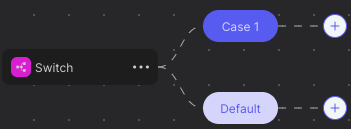
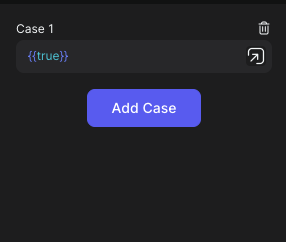
The 'Switch / Case' node is a fundamental component in Peaka that enables you to create conditional logic. It allows you to define cases and associate specific actions or nodes with each case. The node evaluates conditions and executes the corresponding case based on the condition that matches.
## What is the 'Switch / Case' Node?
The 'Switch / Case' node is a fundamental component in Peaka that enables you to create conditional logic. It allows you to define cases and associate specific actions or nodes with each case. The node evaluates conditions and executes the corresponding case based on the condition that matches.
 ## Conclusion
'Switch / Case' is a versatile feature for adding decision-making capabilities to your workflows. You can use it to create branching logic, handle different scenarios, and control the flow of your Peaka applications effectively.
## Conclusion
'Switch / Case' is a versatile feature for adding decision-making capabilities to your workflows. You can use it to create branching logic, handle different scenarios, and control the flow of your Peaka applications effectively.